YESS!!!!! The new Ubuntu Jaunty is on my computer (9.04 Jaunty Jackalope, which is officially alpha, erm, 6, right now). Hey there are a few bugs but it's an alpha, it's actually much more stable than the alpha of Gutsy or even Hardy was. Although the name 'Hardy' really does suit that particular LTS release of Ubuntu. It is hardy to the most foolish of people, and is crash-able by only the people who want to crash it, like me. I kernel panicked it once, but only by deleting some major system file in the /boot folder! But the alpha of hardy? That was a different story: 1) open a gtk dialog. 2) click on the desktop. 3) click on the gtk dialog. 4) there is no 4. Reset button please. That's just one particularly awful bug I found in hardy alpha though.
Anyway, back to the original topic. Jaunty. Now don't get me wrong, I do like Ubuntu kinda, but lately the development has seemed to have, erm....hit something hard, and...fell over shall we say? yes there are things here and there like, um, new popups (those are a real improvement and kick windows's ass on that front btw), plus a new computer 'janitor' that cleans up junk on your computer. And it uses the ext4 file system, of course, which reduces fsck times by about a magnitude of 25 (if I got my estimates right, that is). But apart from things like that, things the general user wouldn't even notice if he/she wasn't a geek, things really do seem to have hit a plateau on the development front. I really haven't noticed many new features, so if it continues this trend I might consider switching to something with a faster development cycle. The trouble with them is that, with that there tends to be the fact that it's still quite a new and undeveloped distro, like gOS for instance (which is based on Ubuntu I believe).
On the KDE side, things are looking bad. Not bad, worse than that...erm...you can think of any word and it won't be quite bad enough to describe the badness of KDE4. It is UNUSABLE. UNUSABLE. Can't use it. I have reinstalled KDE4 three times, reinstalled my system once, then reinstalled KDE4 another time, and each time it has the same fault: it just won't work. I try launching a program and it freezes. why couldn't they stick with KDE3.5 for $&%@ sake? It worked and it was damn good. Sorry KDE guys, but I'ma stick with GNOME for the time being. KDE sucks big time.
On the windows side, things start to be getting better, bit by bit, slowly but surely recovering from the miserable days of Vista, the second worse windows distro (actually, make that the worst. I'd take win95 over vista any day :P). Yes, low-IQ person, I'm talking about windows 7 if you're wondering. I've installed the Beta of it on my machine and...well...things are at least a bit better than Vista. It's supposed to be faster than vista, haven't noticed that yet but I haven't been doing anything intensive on it apart from a few games of GRID (and that's not all that intensive even on max settings). From what I've seen of it, I wouldn't pick it over XP x64 though (which I use right now for anything that needs Windows).
Oh btw I had some hardware additions to my computer:
New harddisk. 750GB Samsung Spinpoint F1. One Windows XP partition, one Linux /home partition, one Linux root partition, one Linux swap partition. £70 inc. P&P
New GPU!!! nVidia 9800GT 512MB GDDR3 RAM PCI express x16 (duh). £100 inc. P&P
Wednesday, 18 March 2009
Jaunty

Sunday, 5 October 2008
lots of stuff, read on...
Sorry i haven't posted for AAAAAAAAAAGES.
Alot has happened computer wise and not computer-wise:
1) I've learn't lots of skills in web design (and still more to learn ;)). Using these skills, I've made a website using the drupal content management system, you can access my website here. It's for a home education group called AWE that I go to, (I'm home educated BTW), and please do not make an account on it because it'll just get wiped off. Strictly having an account is for AWE members only.
2) My spanish teacher had to leave for Colombia, which was very unfortunate. So I enrolled to do a GCSE spanish course in Hackney college, and got in (of course :P)!!!!!! Next year I'll have my first GCSE, in Spanish.
3) I'm techically dual booting Windows and Linux, so i've partly joined the other side....but you'll be pleased to know that i'm writing this in Linux, and only use my windows partition for: a) gaming, b) starry night, c) Flash, and d) Google Chrome until they make a Linux version. (great browser BTW)
see ya soon
fela
Monday, 7 April 2008
binary blobs
apparently, GNU have said that Linux is a breach of the terms of the GNU General Public License, by far the most popular license for open source software. The reason is that Linux includes 'binary blobs': drivers and whatnot for hardware, namely video cards, that the source code isn't freely available to view, study, modify and redistribute of, as the GPL states it should be. But the companies that provide these closed source drivers are NOT willing to release the source code (read: don't give a sh!t about linux). This causes a dillemma: either we have closed source drivers and breach the true open source spirit, or we stick to open source software, at a price (e.g no hardware video acceleration). It's a choice that us Linux users have to make.
Thursday, 13 March 2008
Open Movie Editor
Open Movie Editor is a pretty self explanatory, open source movie editor. You can get it here (http://www.openmovieeditor.org/). I tried compiling/installing it from source last night, managed to get it installed after compiling a few dependencies, then when I tried to execute it it gave me an error, some shared library missing or something, that should've been installed with one of the dependencies. So, unless you know what that problem could be and know how to fix it, If you're on Ubuntu if you want to get it installed quickly and easily then just type: sudo aptitude install openmovieeditor in a terminal to install it. It's also in Debian and OpenSUSE repositories.
Right now OME is only available for Linux, the developers are looking for people to port it to OS X and possibly Windows (the only reason there's no OS X version is that the developer doesn't have access to an Apple Mac :S). I guess porting to OS X would be easier than windows as OS X is pretty similar to Linux anyway, at it's core.
Saturday, 1 March 2008
GTK hack (mac-menubar)
I hacked my GTK to have a mac-menu applet that places the menu bar on the main gnome panel like Mac OS X (I did this for two reasons: I find it easier, as I used OS X before Ubuntu and not Windows; and I want as little as possible resembling windows on my Ubuntu installation ;P). You can follow the guide yourself if you want. Be very careful and don't miss a step (unless you know what you're doing) as it could mean fucking Gnome up ('scuse my french ;P). I used apt-build; you could try compiling it yourself without such an automated tool, but don't say I didn't warn you (E: Corrupt dependencies; please install lib-with-100-dependencies etc....) I used apt-build cause even though it compiles the thing, not install from binary, it's incredibly automated and easy to use. (although i wouldn't reccomend hacking your gtk for the average joe computer user..) and BTW as of time of writing, this hack won't work with OpenOffice.org apps and Firefox/Thunderbird. (as in, the apps will still work, just with the menu bars in the same place as usual).
OK I couldn't resist uploading a screenshot (yeh yeh, taking ur bandwidth :P lol):
Do you notice that the menu bar is at the top like OS X? Pretty cool, huh? ;)
WINE
I am using WINE to run some Windows apps under Linux, and some of them run surprisingly well. Cut to the screenshots, first we have Macromedia Flash 8 (Adobe Flash CS3 doesn't like WINE):
Adobe Audition also works surprisingly well:
I also have Macromedia Dreamweaver 8 working under WINE aswell.
In both of those screenshots, you saw Windows apps running seamlessly under a Linux Ubuntu installation, without the need to run Windows in the background while making it look seamless. Goto winehq.org for more info, download, etc.
Sunday, 27 January 2008
The GIMP
The GIMP (GNU Image Manipulation Program) is a open source program for image editing that rivalls Adobe Photoshop in features. If you are thinking of getting Photoshop®, I suggest that you try the GIMP first, as it's totally free (and you can get the source code if you want to help develop it). If you want to run the GIMP under OS X, you will have to install Apple's X11 (if not already installed). You can do this from the system disk that came with your Mac. (or PC if you hackintoshed ;D). Download page is here.
The other Adobe program that there is a very popular open source alternative for is Adobe Illustrator. The alternative is Inkscape (http://www.inkscape.org/), which I have found to be in a way better than Illustrator (the version that I use is CS3), as when I opened an image that was 4707x4000 px in Illustrator it just wouldn't open, whereas in Inkscape the same image would work just fine on my PowerMac G5 2.5GB SDRAM. Both the GIMP and Inkscape are multiplatform (Windows, Mac OS X, Linux), and other UNIXes such as FreeBSD, and of course the source code tarball is available.
Monday, 31 December 2007
Mac4Lin: ditched
A few days ago I decided I didn't want all the leopard-lookalike stuff on my linux box, just a nice ubuntu look. The main reasons were: (1) that it created gtk errors for EVERY app, and (2) it also used a hell of alot of RAM. I also thought, 'why would I want to make Gnome look like a propietary GUI?'. What I ended up doing is just having preset icons/themes and stuff, then hacking it a little. Right now I have Human icons, Clearlooks window border (with default blue color), and Glossy controls. I hacked icons like the rhythmbox tray icon (I actually got that icon of gnome-look) and the computer icon (I bodged that together in GIMP). Here is an overview of my desktop, grey-propietary-leopard-look free (I got the wallpaper from interfaceLIFT):
Tuesday, 25 December 2007
Cool screensaver on ubuntu
There's a really cool screensaver called Helios that comes with the Gnome based ubuntu distribution. If you use ubuntu, try it out!
Sunday, 23 December 2007
Stable web browser for GNU/Linux
Firefox is the web browser that comes on nearly all GNU/Linux distros, and often is the sole one (i.e. there is no other preinstalled web browser). But the truth is, firefox under GNU/Linux is still very buggy, and I reckon it should be considered a beta. But GNU/Linux users: don't dispair! There are two other web browsers that aren't so buggy (and alot more if you use google 8-0); namely Epiphany and Konqueror. Konqueror comes with KDE as part of the package, so if you use KDE and haven't tried out Konqueror for web browsing, give it a go. I can tell you it's one of the best out there. For GNOME users, try out epiphany (most users will have to download and install the package as it doesn't come with many (if not any) GNOME distros). Epiphany is very stable, but it's not nearly as feature rich as Firefox. Use epiphany if you want a good, stable web browser that doesn't crash all too often (in fact I am typing this under epiphany right now ;D), but isn't too feature rich either. Both Epiphany and Konqueror run on either platform (GNOME or KDE) but generally, Konqueror will run better on KDE and Epiphany will run better on GNOME (that goes for lot's of other apps too). For Xfce/Fluxbox/[insert obscure desktop environment here] users, you probably know what you're doing! ;)
Saturday, 15 December 2007
logitech LX7 linux driver
I'm using a Logitech LX7 cordless optical mouse under linux ubuntu 7.10, kernel 2.6.22. The default mouse driver that X uses doesn't support 5 button mice (which is what I have). I have gone fiddling with the xorg.conf configuration file in /etc/X11, completely corrupted X, and am now typing this under the command line interface using lynx. Does anyone know of any linux 5 button mouse drivers that you can use without completely p***ing X off? I am f***ed off with this sh!t. Someone must of written a stupid, FREAKING DRIVER. Thanks in advance to anyone who even posts a comment.
Friday, 16 November 2007
Embedded terminal

This is my handy terminal, embedded in the GNOME desktop. I did this using devilspie.
Sunday, 21 October 2007
Lynx
Fact: GUIs (Graphical User Interfaces) are bad for geeks. The full-on GUIs of web browsers like Mozilla Firefox can be dangerous at times, + big on the memory req.s. So that's why there's lynx for linux. It's a very simple web browser that runs in - guess what? - the terminal. So now you can browse the web with 128k of RAM. Great!
Thursday, 18 October 2007
Monday, 15 October 2007

Sunday, 14 October 2007
The wonders of Linux
Hey. I've finally sorted out an old pentium 4 with linux ubuntu. And it works wonders.
Tuesday, 9 October 2007
Getdeb
If you use Ubuntu, you might want to check out Getdeb, a site like packages.ubuntu.com. You might even want to add it to your repositories file, if you enjoy a bit of hacking and don't mind potentially mucking up your system.
Ubuntu 7.10 Beta Review
Ubuntu 7.10: Gutsy Gibbon
The install went OK, after a couple of tries - VMware problems?
Startup hasn't changed very much. No splash?
The default desktop. There's a Deskbar by default and a new user switcher.
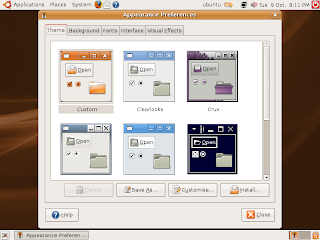
There's a new settings manager - "Appearance". Looks like Vista.
The Themes manager, similar style...
Firefox, without the latest update.
The new Places menu.
New default Home folders
The stripped-down version of Synaptic seems to have been improved.
Asking for a password...
Synaptic itself seems to have no obvious improvements.
The User switcher seems similar to the one in OSX...
Shutdown options!
Final shutdown.
Ubuntu 7.10 looks like it is going to be a brilliant upgrade.




Monday, 8 October 2007
Some alternatives
MICROSOFT. Because you have no choice. MUA HA HA HA HA!!!
But is it? NO. If you bought a PC and the windows OS is annoying the sh*t outta you, there are plenty of alternative OSes, most notably linux. Our fave distro (although you get plenty of others) is Ubuntu, who's slogan is "Linux for human beings". This is because Linux used to be an OS that only geeks could use, but now it is very easy to configure/use it even if you have limited technical knowledge, and there's even a forum for getting answers to your problems with ubuntu. The word "Ubuntu" is an ancient african word that means 'Humanity to others'. And linux is free, so no more 30 day free trials, activating, and the like. And its not just free as in beer, its free as in speech, so anyone can get access to the source code and edit it themselves, free of charge. More of this in the GPL general public license. Another point: If you switch to linux, you can safely say that you won't get viruses. This is because for every Linux computer there are 1,000,000 windows computers. A virus maker's not going to make linux viruses if there are 1,000,000 times the amount of windows machines.
So no more of that stupid Operating System, Microsoft Window$!!!
NOTE: Ubuntu, unfortunately, is only an option for people with a reasonable amount of computer knowledge. (mal)