I have finally got round to reinstalling Ubuntu to my new WD 250GB SATA hdd, I think I have pretty much got all of my applications installed that I had before, and all of my files as i just had to copy them over from my old installation and I made copy's of /etc and lists of packages from dpkg.
Tuesday, 31 March 2009
Ubuntu Reinstalled
posted by
TheguywholikeselectronicsandLinux
at
3/31/2009 10:57:00 am
1 flames
tagged as BIOS, Clonezilla, hard drive, Kbuntu, kde, reinstall, SATA, SystemRescueCD, ubuntu, Ubuntu PC, Ubuntu Studio
Wednesday, 18 March 2009
Jaunty
YESS!!!!! The new Ubuntu Jaunty is on my computer (9.04 Jaunty Jackalope, which is officially alpha, erm, 6, right now). Hey there are a few bugs but it's an alpha, it's actually much more stable than the alpha of Gutsy or even Hardy was. Although the name 'Hardy' really does suit that particular LTS release of Ubuntu. It is hardy to the most foolish of people, and is crash-able by only the people who want to crash it, like me. I kernel panicked it once, but only by deleting some major system file in the /boot folder! But the alpha of hardy? That was a different story: 1) open a gtk dialog. 2) click on the desktop. 3) click on the gtk dialog. 4) there is no 4. Reset button please. That's just one particularly awful bug I found in hardy alpha though.
Anyway, back to the original topic. Jaunty. Now don't get me wrong, I do like Ubuntu kinda, but lately the development has seemed to have, erm....hit something hard, and...fell over shall we say? yes there are things here and there like, um, new popups (those are a real improvement and kick windows's ass on that front btw), plus a new computer 'janitor' that cleans up junk on your computer. And it uses the ext4 file system, of course, which reduces fsck times by about a magnitude of 25 (if I got my estimates right, that is). But apart from things like that, things the general user wouldn't even notice if he/she wasn't a geek, things really do seem to have hit a plateau on the development front. I really haven't noticed many new features, so if it continues this trend I might consider switching to something with a faster development cycle. The trouble with them is that, with that there tends to be the fact that it's still quite a new and undeveloped distro, like gOS for instance (which is based on Ubuntu I believe).
On the KDE side, things are looking bad. Not bad, worse than that...erm...you can think of any word and it won't be quite bad enough to describe the badness of KDE4. It is UNUSABLE. UNUSABLE. Can't use it. I have reinstalled KDE4 three times, reinstalled my system once, then reinstalled KDE4 another time, and each time it has the same fault: it just won't work. I try launching a program and it freezes. why couldn't they stick with KDE3.5 for $&%@ sake? It worked and it was damn good. Sorry KDE guys, but I'ma stick with GNOME for the time being. KDE sucks big time.
On the windows side, things start to be getting better, bit by bit, slowly but surely recovering from the miserable days of Vista, the second worse windows distro (actually, make that the worst. I'd take win95 over vista any day :P). Yes, low-IQ person, I'm talking about windows 7 if you're wondering. I've installed the Beta of it on my machine and...well...things are at least a bit better than Vista. It's supposed to be faster than vista, haven't noticed that yet but I haven't been doing anything intensive on it apart from a few games of GRID (and that's not all that intensive even on max settings). From what I've seen of it, I wouldn't pick it over XP x64 though (which I use right now for anything that needs Windows).
Oh btw I had some hardware additions to my computer:
New harddisk. 750GB Samsung Spinpoint F1. One Windows XP partition, one Linux /home partition, one Linux root partition, one Linux swap partition. £70 inc. P&P
New GPU!!! nVidia 9800GT 512MB GDDR3 RAM PCI express x16 (duh). £100 inc. P&P
Monday, 8 December 2008
hey, my mouse pwns, linux only!
My mouse (the logitech LX7 btw it's the only cordless that pwns), has 7 buttons. Ie. left click, right click, middle click, scroll, sideways scroll, back, forward. The sidways scroll works in Linux! It doesn't work in windows!!! So long windows suckers. I'm running ubuntu 8.10, and I didn't install any drivers to make it work fully. Linux works out of the box! In fact, my only hardware that didn't work out of the box is...let's see here....webcam worked...mouse worked...keyboard worked...sleep + hibernate worked...omg, EVERYTHING WORKED STRAIGHT OUT OF THE BOX FOR ME ON LINUX UBUNTU 8.10 INTREPID IBEX, 150% RECOMMENDED OPERATING SYSTEM!!!!!! goto ubuntu.com to download this terrific OS. Or you can request a free cd that takes 6 to 10 weeks to deliver depending on country, the free cd comes with stickers for your computer or anything else.
posted by
Colonel Panic
at
12/08/2008 07:08:00 pm
0
flames
tagged as compatibility, hardware, ubuntu
Friday, 25 July 2008
Ubuntu reinstall
I have had various problems with my Ubuntu installation:
Deb package installer not working, add/remove not working, compiz not working, etc.
So i decided to reinstall Ubuntu completely...
I backed up my user Dir onto my new 4GB (W00T!!) mem stick then made a Ubuntu 8.04.1 disk and tested it thoroughly then reinstalled Ubuntu (forgetting to make a backup partition :-( oh well...) and then installed Ubuntu studio and some other apps and walla!! It worked!!!
Few!!!
The only problem i had is forgot to show the hidden files when copying my user Dir so i lost my Uplink user file that i had been playing on (Dow!! :-[ )
Thursday, 10 April 2008
ubuntu hardy beta - 3 installs in one morning
The HDD came w0.ot :D
I put Ubuntu 8.04 Hardy LTS Beta onto it. That's what i'm running now. Oh and btw, there seems to be a little bug in the partitioner of the hardy beta installer - i tried partitioning keeping a older partition intact (result of breaking my system within 5 minutes and having to reinstall xD). It seemed to install fine, but when i tried booting into the system my machine kernel panicked just after the 'Starting up' message. I think it was trying to load / as a block device - and obviously failing - I can't remember exactly what it said though, after 'Kernel panic - not syncing:'. One more reinstall later (that's 3 clean installs in one morning lol) and here I am - with a perfectly functioning install of Ubuntu Hardy beta on a 160GB HDD - yay! :D
posted by
Colonel Panic
at
4/10/2008 11:02:00 pm
0
flames
tagged as hard drive, hardy, kernel panic, ubuntu
Thursday, 13 March 2008
Open Movie Editor
Open Movie Editor is a pretty self explanatory, open source movie editor. You can get it here (http://www.openmovieeditor.org/). I tried compiling/installing it from source last night, managed to get it installed after compiling a few dependencies, then when I tried to execute it it gave me an error, some shared library missing or something, that should've been installed with one of the dependencies. So, unless you know what that problem could be and know how to fix it, If you're on Ubuntu if you want to get it installed quickly and easily then just type: sudo aptitude install openmovieeditor in a terminal to install it. It's also in Debian and OpenSUSE repositories.
Right now OME is only available for Linux, the developers are looking for people to port it to OS X and possibly Windows (the only reason there's no OS X version is that the developer doesn't have access to an Apple Mac :S). I guess porting to OS X would be easier than windows as OS X is pretty similar to Linux anyway, at it's core.
posted by
Colonel Panic
at
3/13/2008 10:23:00 am
0
flames
tagged as linux, open movie editor, open source, ubuntu
Sunday, 9 March 2008
New Human theme
I'm testing Ubuntu 8.04 "Hardy" alpha 6, and I've noticed that the default Human theme has vastly improved. Here's a screenshot of thewidgetfactory: (and btw, the progress bars are animated :))
posted by
Colonel Panic
at
3/09/2008 12:26:00 pm
1 flames
Saturday, 1 March 2008
GTK hack (mac-menubar)
I hacked my GTK to have a mac-menu applet that places the menu bar on the main gnome panel like Mac OS X (I did this for two reasons: I find it easier, as I used OS X before Ubuntu and not Windows; and I want as little as possible resembling windows on my Ubuntu installation ;P). You can follow the guide yourself if you want. Be very careful and don't miss a step (unless you know what you're doing) as it could mean fucking Gnome up ('scuse my french ;P). I used apt-build; you could try compiling it yourself without such an automated tool, but don't say I didn't warn you (E: Corrupt dependencies; please install lib-with-100-dependencies etc....) I used apt-build cause even though it compiles the thing, not install from binary, it's incredibly automated and easy to use. (although i wouldn't reccomend hacking your gtk for the average joe computer user..) and BTW as of time of writing, this hack won't work with OpenOffice.org apps and Firefox/Thunderbird. (as in, the apps will still work, just with the menu bars in the same place as usual).
OK I couldn't resist uploading a screenshot (yeh yeh, taking ur bandwidth :P lol):
Do you notice that the menu bar is at the top like OS X? Pretty cool, huh? ;)
Tuesday, 26 February 2008
Ubuntu PC!!!!!
My Ubuntu PC is now working but i can't tell you anything yet because it is not connected to the Internet and dose not have a monitor, and so can't send posts from it.
posted by
TheguywholikeselectronicsandLinux
at
2/26/2008 05:10:00 pm
3
flames
Friday, 8 February 2008
VMware: Hardy Alpha 4
I just compiled VMware server and have done a quick test of the latest build of Ubuntu 8.04 "Hardy". Here are the inevitable screenshots:
^ The default desktop. The theme looks like it's still an embryo in development.
^ Add/remove, the more user-friendly version of synaptic
^doesn't include Firefox 3 beta yet, but give an alpha a chance!

^ Two new GUI apps: top one is GParted, a partition manager tool. Bottom one is Seahorse, a Keyring/Password manager that so totally smacks of Apple's Keychain Access utility. UPDATE 9/2/08: according to Mal, Gparted is a standard LiveCD app that doesn't get installed on a standard HDD install (not new in hardy). Credit goes to Mal for informing me.
This is just an alpha, and I can already see quite a few new stuff just from a five minute test. I'm sure when Hardy comes out in April it will be a swell upgrade.
Saturday, 22 December 2007
GUI's GUI's and more GUI's
GUI's ("gooies" Graphical User Interfaces) are what almost everybody uses to operate a PC.
But they aren’t all good...
Windows Xp made a real good improvement to the old grey look but it is still not so cool.
When Vista Aero came out you could see that they had been working hard at it, a really cool GUI that was easy to use and navigate with, apparently you could find all your files and folders at the touch of a button or so.
But there is one big disadvantage to it, very big.
IT TAKES 1G OF RAM JUST FOR THE GUI!!!!!!.
That is why I would go for the Mac GUI that is even easer to navigate with and is slick and smooth, only takes 64mb (tiger and below) of ram and is well easy to use and cool (compared to windows xp) .
But wait...
There is another better option...
UBUNTU
see this video:
And Ubuntu Beryl has a skin that looks and feels a lot like Vista Aero all in 512mb (But it works better with 1G) ram!
So what do you think Pls post your comments 8-)
------------
Edit:
1. Theguywholikeselectronicsandlinux
2. Theguywholikeselectronicsandlinux
posted by
TheguywholikeselectronicsandLinux
at
12/22/2007 07:31:00 pm
8
flames
tagged as beryl, Graphical User Intrefaces, gui, mac, ubuntu, windows, windows vista, windows vista look-alike, windows xp, x:YoutubeEmbed
Thursday, 18 October 2007
O crap.
That post below is wrong until some time in the night. I thought that they would release gutsy at excatly midnight, when the countdown stopped, but obviously not. I'll report back in the morning though!
Tuesday, 9 October 2007
Getdeb
If you use Ubuntu, you might want to check out Getdeb, a site like packages.ubuntu.com. You might even want to add it to your repositories file, if you enjoy a bit of hacking and don't mind potentially mucking up your system.
posted by
Colonel Panic
at
10/09/2007 07:24:00 pm
0
flames
tagged as getdeb, hacking, linux, repositories, ubuntu
Ubuntu 7.10 Beta Review
Ubuntu 7.10: Gutsy Gibbon
The install went OK, after a couple of tries - VMware problems?
Startup hasn't changed very much. No splash?
The default desktop. There's a Deskbar by default and a new user switcher.
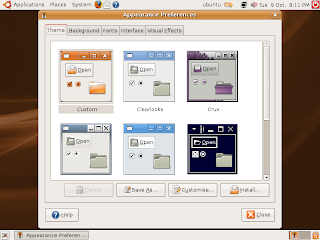
There's a new settings manager - "Appearance". Looks like Vista.
The Themes manager, similar style...
Firefox, without the latest update.
The new Places menu.
New default Home folders
The stripped-down version of Synaptic seems to have been improved.
Asking for a password...
Synaptic itself seems to have no obvious improvements.
The User switcher seems similar to the one in OSX...
Shutdown options!
Final shutdown.
Ubuntu 7.10 looks like it is going to be a brilliant upgrade.
Monday, 8 October 2007
Some alternatives
MICROSOFT. Because you have no choice. MUA HA HA HA HA!!!
But is it? NO. If you bought a PC and the windows OS is annoying the sh*t outta you, there are plenty of alternative OSes, most notably linux. Our fave distro (although you get plenty of others) is Ubuntu, who's slogan is "Linux for human beings". This is because Linux used to be an OS that only geeks could use, but now it is very easy to configure/use it even if you have limited technical knowledge, and there's even a forum for getting answers to your problems with ubuntu. The word "Ubuntu" is an ancient african word that means 'Humanity to others'. And linux is free, so no more 30 day free trials, activating, and the like. And its not just free as in beer, its free as in speech, so anyone can get access to the source code and edit it themselves, free of charge. More of this in the GPL general public license. Another point: If you switch to linux, you can safely say that you won't get viruses. This is because for every Linux computer there are 1,000,000 windows computers. A virus maker's not going to make linux viruses if there are 1,000,000 times the amount of windows machines.
So no more of that stupid Operating System, Microsoft Window$!!!
NOTE: Ubuntu, unfortunately, is only an option for people with a reasonable amount of computer knowledge. (mal)
Tuesday, 2 October 2007
Debian and its crap
I'm not dissing the Debian GNU/Linux OS in any way whatsoever, but I am going to say that it must have a lot of crap on it, as the full set requires 21 CDs!!! Even Ubuntu (highly recommended for the newbie linux user) is just small enough to fit on a 700MB CD, which includes cool apps such as the GIMP image editor, lots of games, and stuff.
Saturday, 29 September 2007
Ubuntu installer
If you're thinking of downloading and installing linux, but have slow internet, download the alternate text-based installer from Ubuntu.com, which doesn't include the livecd, and is just a text-based installer iso, making it a few hundred megs smaller.
Thursday, 27 September 2007
Probs with Linux
Anyone having trouble installing Ubuntu 7.04 Feisty Fawn under VPC on mac/windows? Unfortunately because of a bug with Ubuntu 7.04, it doesn't support emulated PS/2 mouse, which is nicely just what VPC does when running alternate OSes. But, yay, I know how to fix the problem!!!! First, make sure that you start Ubuntu in safe graphics mode (there's a bug with VPC that makes the graphics go all weird if you don't), when it's started up press left option (alt on PC) + F1. That should select the applications menu. Then navigate with the arrow keys to System > Preferences > Accessibility > Keyboard Accessibility. When the dialog opens, check "Enable Keyboard Access" or something like that. Then use tabs and arrow keys to select the tab "Mouse Keys" or something. Check "Enable Mouse Keys", press tab until "Close" is selected, and press spacebar to select. You can now move the mouse using your number key pad. Easy, huh?
For laptop users with compact keyboards:
You may not have a seperate number keypad on your keyboard, but one that you can activate by pressing num lock. You will have to do this every time you use your mouse. Maybe you should just install Linux on a real partition instead of slow-as-sh*t vpc!!!
posted by
Colonel Panic
at
9/27/2007 01:37:00 pm
0
flames
tagged as feisty, help, install, linux, mouse keys, Trouble, ubuntu, VPC